

Every organization has them: roles that exist on paper but have no one sitting in the seat. Whether a position just opened up due to a resignation, a backfill is pending budget approval, or a brand-new role is being created for a future hire, vacant positions are a normal part of how organizations grow and change.
The tricky part is knowing how to represent those open roles clearly in your org chart without creating confusion across your team. If your org chart only reflects the people who are currently employed, you are missing half the picture. Vacant roles tell a story too. They show where your organization is headed, where accountability gaps exist right now, and where hiring managers need to focus their energy. Managing them well is not just an HR best practice. It is a structural necessity.
Why Do Vacant Roles Belong in Your Org Chart?
A lot of teams make the mistake of leaving open positions completely off their org chart until a hire is made. The logic makes sense on the surface: why show a box with no one in it?
But an unfilled role is still a real position with real responsibilities. Someone on your team is probably covering those duties in the interim, even if informally. And anyone looking at your chart for onboarding, workforce planning, or organizational design purposes needs to know that the gap exists.
Keeping vacant roles visible helps you identify accountability gaps immediately, gives recruiters and hiring managers structural context for each open position, and keeps everyone oriented during transitions. Your org chart should reflect not just where you are today but where you are building toward.
How Should You Represent Vacant Roles Visually?
There is no universal standard, but consistency is everything. Pick a method and apply it the same way across your entire chart so anyone reading it immediately understands what they are looking at.
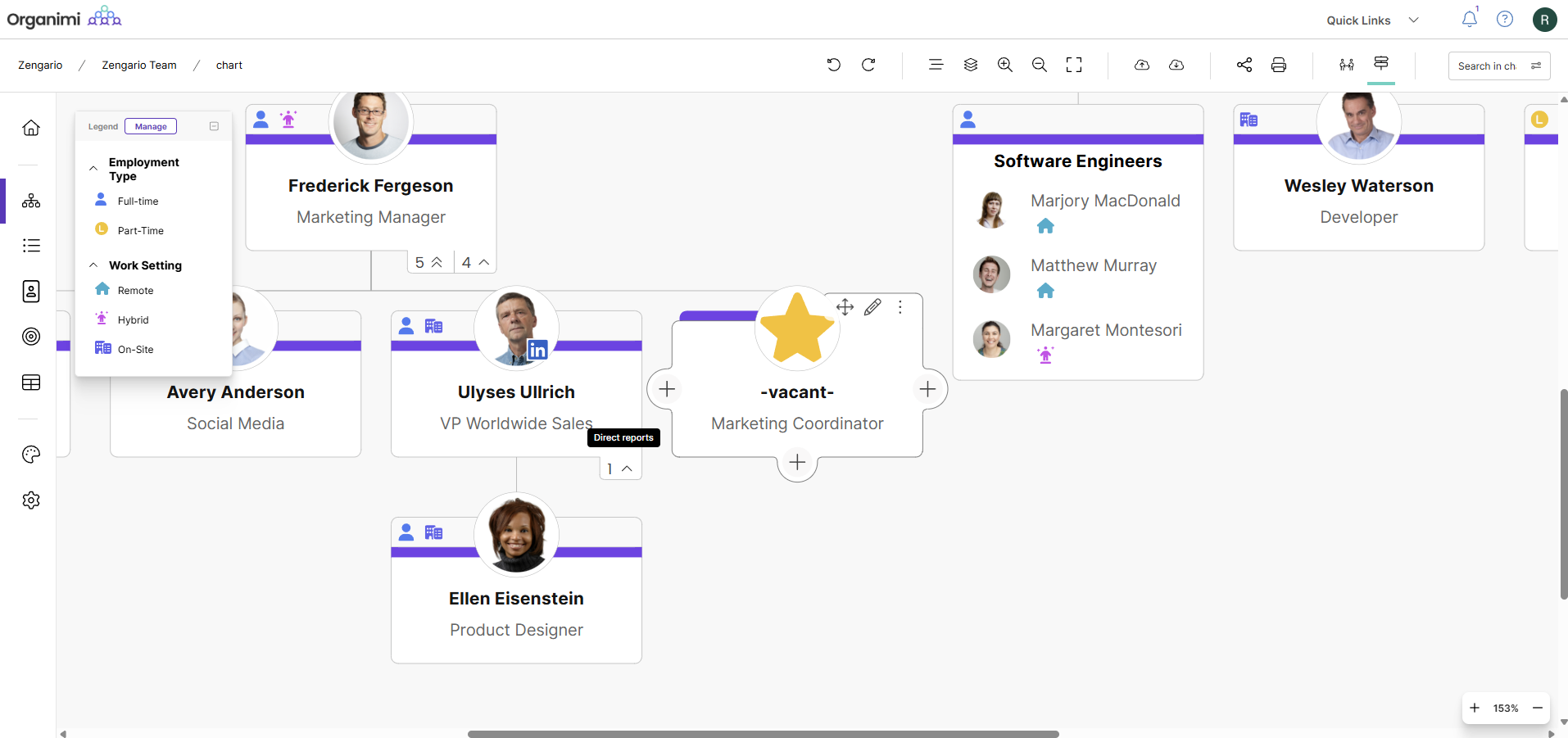
- Use a placeholder label: Replace the person’s name with something like “Open Position,” “Vacant,” or “TBH” (to be hired) to make it simple and universally understood. With Organimi, this can be quickly done by enabling the vacant role setting within your chart.
- Apply a distinct color or badge: A dedicated color for vacant roles, like grey or yellow, makes open positions visually scannable at a glance without cluttering the chart with extra text.
- Add context through custom fields: For more detailed workforce planning, attach information like the expected hire date, the interim contact, or a link to the job posting directly to the role card. This turns your org chart into a living document rather than a static snapshot.
- Maintain a future state chart: For organizations going through restructuring or rapid growth, keeping a second version of your chart that shows all roles filled is useful for executive planning and board reporting. This can be done in Organimi by using the duplicate chart feature.
Purpose-built org chart tools like Organimi make all of these approaches easy to implement, so you do not need a separate spreadsheet to track open positions alongside your chart.
How Do You Handle Interim Coverage and Reporting Lines?
When a role goes vacant, the most pressing question is usually: who do those direct reports talk to now?
If one person is covering the duties of the vacant role, temporarily update the reporting lines in your chart to reflect that. Note it clearly through a label or badge so no one assumes the change is permanent. If responsibilities are being split across multiple people, a dotted-line or matrix structure works well to show secondary reporting connections without disrupting the primary hierarchy.
The key is to not leave it ambiguous. An org chart that shows a vacant role with no interim owner and no redirected reporting lines creates more confusion than it resolves.
How Do You Keep Vacant Roles Accurate Over Time?
Org charts go stale fast, and vacant roles make the problem worse. A position that was open three months ago might now be filled, on hold, or restructured entirely. A few habits keep things current.
Tie org chart updates to your hiring workflow so that every time a job requisition opens or closes, the chart gets updated. Assign a clear owner for the chart, whether that is an HR manager, an executive assistant, or an operations lead. An org chart tool that integrates with your HR system or directory tool (such as Organimi) helps you stay hands-off while keeping your chart accurate and up to date. Automating even part of the update process keeps your chart from falling behind between review cycles.
Where Do You Start?
If your org chart has no way to distinguish vacant roles from filled ones today, the fix is simpler than it sounds. Decide on a convention, apply it consistently, update your reporting lines to reflect interim coverage, and build the habit of keeping it current.
When this is done well, your org chart becomes more than a picture of who works at your company. It becomes a real-time map of your structure, your gaps, and where you are headed. That is useful for everyone from a new hire learning the organization to a leadership team planning next year’s headcount.
Tools like Organimi make it straightforward to build and maintain charts that reflect your organization as it actually is, open roles included, without the back-and-forth of manual updates or disconnected spreadsheets.
Ready to create your org chart? Organimi makes it simple to build, update, and share professional org charts that grow with your company. Start mapping your organization today!